



When your field teams aren’t aligned, everything slows down. A missed update, a late technician, or a last-minute job change can quickly snowball into unhappy customers and lost revenue.
It’s not that your team isn’t working hard—it’s that they’re often working blind. Static spreadsheets, scattered emails, and phone calls don’t cut it when your operations rely on real-time decisions.
That’s why coordination needs to be built into your system—not patched on top of it.
Tools like Bitrix24 bring together scheduling, communication, CRM, and mobile access into one streamlined workspace.
In this article, you’ll learn how field service businesses around the world use Bitrix24 to simplify dispatch, connect mobile teams, and deliver faster, more reliable service.
Because when everyone’s on the same page? Well—your service, it speaks for itself.
Why Field Team Coordination Is Uniquely Challenging
Coordinating field teams isn’t like managing an office-based workforce. Service businesses deal with fast-moving parts, unpredictable schedules, and constantly changing customer needs. That creates real coordination pressure across your operations.
Here’s why it’s especially tricky:
1. Multiple Time Zones and Mobile Schedules
Field teams often work across cities, regions, or even countries. When your dispatch team is in one time zone and your techs are in another, basic scheduling becomes a logistical headache. Syncing calendars and availability in real time is essential—but hard without the right tools.
2. Outdated Communication Methods
Many businesses still rely on phone calls, emails, or static spreadsheets to dispatch jobs and update teams. But what happens when a field tech misses a call, or a last-minute change gets buried in someone’s inbox? Information gaps like these lead to missed appointments and unhappy customers.
3. Rapid Changes Are the Norm
Delays, cancellations, reroutes—these are daily realities in field service. But when there’s no system in place for instant communication, it’s tough to adapt on the fly. Without live updates, your field staff are left out of the loop, and customers are left waiting.
4. Lack of On-the-Go Context
Field techs need more than just an address and a time slot. They need context:
- Has this customer had issues before?
- Are there special instructions or preferences?
- What tools or materials are required?
Without mobile access to job history or CRM notes, field teams may arrive unprepared—slowing down the job and impacting service quality.
Key Features Every Service Business Needs for Better Field Coordination
To overcome the challenges of field team management, you don’t just need more staff—you need smarter systems. Whether you’re managing five techs or fifty, your tools should help you coordinate jobs, communicate instantly, and keep customer experience top-tier.
Here are the essential features to look for when choosing your coordination platform:
Centralized Job Assignments
Every job should be assigned with clear details:
- Time and date
- Customer name and contact info
- Exact location with map or GPS link
- Service request description
- Technician notes or requirements
Having everything in one digital workspace removes guesswork and manual handovers.
Real-Time Status Updates
Your field techs should be able to update job status on the go:
- “On the way”
- “In progress”
- “Completed”
- “Needs follow-up”
These live updates let dispatchers and managers see what’s happening without making a single phone call. They also help balance workloads and react to urgent changes.
Mobile CRM Access
A full customer profile in your technician’s pocket makes a big difference.
With a mobile-friendly CRM, your team can:
- View service history and preferences
- Log notes and photos from the job site
- Avoid duplicate data entry later
That’s how you deliver consistent, personalized service—every time.
Team Chat and Push Notifications
Things change fast in the field. That’s why real-time communication is non-negotiable.
Your coordination tools should include:
- Direct and group chat
- Push alerts for urgent updates or reroutes
- Read receipts so nothing gets missed
This keeps everyone aligned, even when schedules shift mid-day.
Feedback and Follow-Up Tools
The service doesn’t end when the job is done.
A good system helps you:
- Automatically trigger satisfaction surveys
- Send review requests or referral links
- Kick off the next job or upsell offer
That post-job touchpoint strengthens your customer relationship—and it doesn’t need to be manual.
How Bitrix24 Powers Smarter Field Coordination
If you’re tired of juggling multiple apps and manual updates to keep your field team running smoothly, Bitrix24 brings everything together in one platform. From scheduling and CRM to mobile chat and automated follow-ups, it’s built to streamline how you operate in real time.
Here’s how Bitrix24 supports every stage of the service workflow:
CRM: Full Customer Profiles at Your Fingertips
Bitrix24’s CRM doesn’t just track leads—it stores everything your field techs and dispatch team need to know:
- Complete service history
- Contact info and job locations
- Notes on preferences or past issues
- Files, photos, and contracts
Your techs can access this info via mobile before arriving on-site, so they show up prepared and informed.
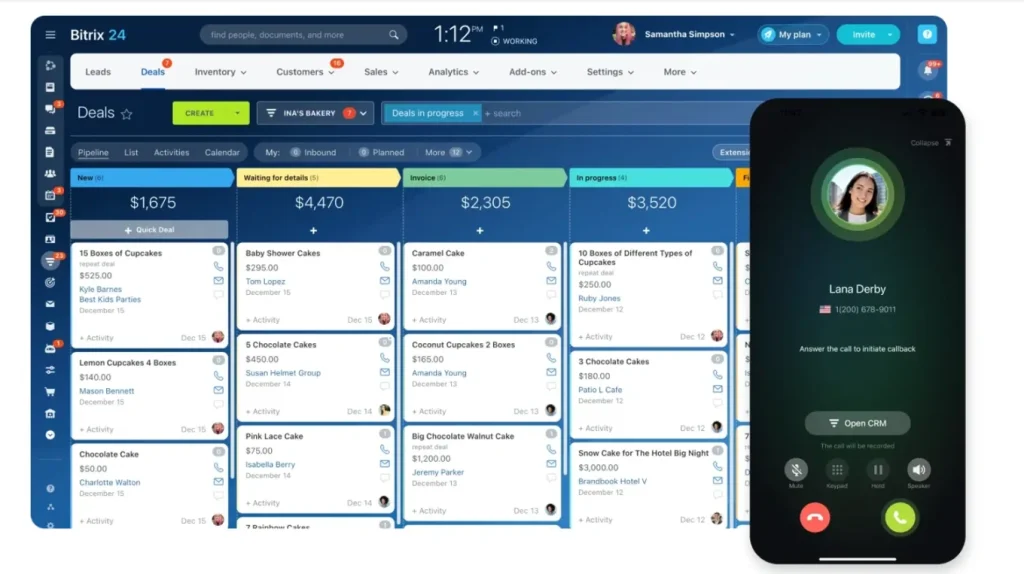
Task Assignments: Job Scheduling Made Simple
You can create and assign tasks in just a few clicks:
- Set deadlines and time blocks
- Attach job descriptions, checklists, and directions
- Delegate to individual techs or entire teams
- Track progress in real time
No more guessing who’s doing what. Bitrix24 gives you full visibility into assignments, completions, and bottlenecks.

Mobile Collaboration: Real-Time Sync on the Go
The Bitrix24 mobile app keeps your field team fully connected—wherever the job takes them:
- Map-integrated task locations for quick navigation using external GPS apps
- Push notifications for new assignments, updates, and schedule changes
- Instant messaging for real-time communication with dispatch or peers
- Task status updates and time tracking, so everyone knows what’s done and what’s next
Whether you’re coordinating across town or across continents, nothing gets lost in translation.
Calendar Views: Smart Scheduling and Availability
Use shared calendars to see:
- Who’s available
- When jobs are scheduled
- Where each team member will be
Color-coded timelines and filters let you spot overloads, overlaps, or gaps instantly. It’s especially useful when managing urgent requests or cancellations.

Automation: Smooth Follow-Ups and Reduced Admin
With Bitrix24 automations, you can:
- Send confirmation texts or emails after booking
- Trigger feedback surveys once a job is marked “complete”
- Launch next-step workflows like recurring maintenance reminders
These touchpoints happen without you lifting a finger—and they make a big impact on customer satisfaction.
Real-World Scenarios: From Dispatch to Completion
Let’s see how Bitrix24 simplifies the full workflow—from the moment a service is booked to job completion and follow-up. These examples reflect how actual businesses use Bitrix24 to stay connected, efficient, and customer-focused.
Scenario 1: A Plumbing Company Handling Emergency Repairs
The Situation: A customer calls in with a burst pipe issue.
The Workflow:
- Request Logged: Dispatch team enters the job into the Bitrix24 CRM, tagging it as high-priority.
- Task Created: A task is generated with:
- Job details
- Customer location
- Required equipment
- Assigned technician
- Mobile Notification: The field tech instantly receives the task on their phone, with directions and job notes.
- Live Status Update: The tech updates the status to “On the way” and later “In progress.”
- Completion: Upon finishing, they upload before-and-after photos and mark the task complete.
- Automation Trigger: The system automatically sends a follow-up SMS to the customer with a thank-you note and a link to leave feedback.
The Result: Fast dispatch, clear communication, and a seamless customer experience.
Scenario 2: HVAC Firm Managing Daily Service Routes
The Situation: Eight service calls scheduled for one technician’s day.
The Workflow:
- Calendar Planning: The dispatch manager uses the Bitrix24 calendar to assign time slots and route jobs efficiently.
- Team Sync: The technician views the entire schedule on their mobile app and confirms availability.
- Job Execution: As the day progresses, job statuses are updated in real time, and any delays are flagged using the built-in chat.
- Real-Time Adjustments: Dispatch sees a no-show and quickly reroutes the tech to a new job, sending a push alert through the app.
- CRM Logging: Each completed job automatically updates the client’s CRM record for future reference.
The Result: No calls, no chaos—just a smooth flow of updates, adjustments, and completions.
Scenario 3: Pest Control Team with Weekly Routes
The Situation: A pest control company provides weekly visits to multiple commercial properties.
The Workflow:
- Recurring Tasks: Jobs are created as recurring tasks in Bitrix24 with built-in checklists.
- Mobile Execution: Field techs access instructions and previous reports via the CRM on their mobile app.
- Job Notes: After treatment, notes are added to the task, and it’s marked complete with photos attached.
- Follow-Up Campaigns: Bitrix24’s marketing tools automatically send quarterly reminders and educational newsletters to the clients.
The Result: Field techs stay organized, and clients stay engaged—without extra admin.
Tips for Implementing Real-Time Field Coordination
Rolling out a real-time coordination system like Bitrix24 isn’t just about choosing the right tools—it’s about setting up smart workflows your team can rely on. Here’s how to make the most of Bitrix24 for field service coordination.
1. Standardize Job Templates
Set up job templates in Bitrix24 that include:
- Default checklists
- Safety guidelines
- Customer communication notes
- Required tools or materials
This helps techs follow a repeatable process and reduces errors—especially helpful for new hires or growing teams.
2. Use Geotagging and Mobile Alerts
Enable location tagging so dispatchers know where each tech is at any given moment.
Pair this with push notifications to:
- Alert techs of job updates or reroutes
- Send “on the way” messages to customers
- Track travel times and arrival
This boosts both accountability and customer satisfaction.
3. Create Role-Based Groups in Bitrix24
Split your workspace into distinct groups:
- Dispatch group for schedulers and managers
- Field team group for mobile workers
- Optional: Back office group for billing, HR, etc.
Each group can have its own chat threads, calendars, task boards, and document libraries—keeping communication focused and clutter-free.
4. Train Teams to Update Job Status Live
Encourage your field techs to log updates in real time rather than batch them at the end of the day. Benefits include:
- More accurate progress tracking
- Faster issue response from dispatch
- Better visibility for management and customers
You can even make “job status update” part of your task checklist to reinforce the habit.
5. Automate the Follow-Up Process
Let Bitrix24 handle the post-service admin:
- Send automatic thank-you messages or review requests
- Trigger warranty emails or rebooking reminders
- Notify billing or accounting when a task is marked complete
Automations free your team from repetitive tasks and create a polished, professional experience for your clients.
With these best practices, you’ll not only implement Bitrix24 effectively—you’ll transform how your entire service operation works.
Final Thoughts
When your field teams aren’t aligned, things fall apart fast. Missed appointments, frustrated customers, and overwhelmed staff—it’s not a lack of effort. It’s a lack of real-time coordination.
Bitrix24 changes that.
It brings everything—and everyone—into one connected workspace:
- Dispatchers assign jobs with full visibility
- Techs get mobile alerts, directions, and job context instantly
- Managers track progress live and automate the follow-up
Less scrambling. More clarity. Better service—without the burnout.
Join over 15 million users worldwide who rely on Bitrix24 to simplify teamwork, boost productivity, and keep every job running smoothly—wherever it happens.
Stop guessing. Start synching.
